Getting started
Three steps: a game with no window, the sample game, then your own.
1. The smallest game #
go run github.com/nao1215/gozen/examples/minimal@latest
location=camp gold=2
examples/minimal is a 43-line Go host and 17 lines of YAML. It loads the embedded files, creates the game state, and runs the arrival event of the first place without opening a window:
# game.yaml
schema_version: 2
id: tiny-trail
title: Tiny trail
start: {location: camp, party: [walker]}
# data/world.yaml
classes:
  walker:
    name: Walker
    stats: {mhp: 20, mmp: 0, atk: 4, def: 2, mat: 0, mdf: 0, agi: 4, luk: 1}
    exp_for: level * 20
actors: {walker: {name: Walker, class: walker}}
locations:
  camp:
    name: Camp
    on_enter: [{say: A new trail begins here.}, {gold: 2}]
skills:
  attack: {name: Tap, effects: [{damage: 4}]}
  guard: {name: Wait, scope: self}
Every game needs the two battle skills attack and guard, even one without battles.
2. Play Go Zen #
Go Zen is the sample game in examples/go-zen: a town on a painted map, a plaza to walk, a shop and an inn, a three-floor dungeon under the town, moving portraits, and a soundtrack. It takes about forty minutes.
The sample is a module of its own, so its pictures and music do not come with go get. Play it from a clone:
git clone https://github.com/nao1215/gozen
cd gozen/examples/go-zen
go run . --mute
| Input | Meaning |
|---|---|
| Up / Down, Enter / Z / Space | Select and confirm |
| X / Esc | Back, or open the field menu |
| O / F2 | Settings |
| F11 / Alt+Enter | Fullscreen |
| M | Mute |
| Arrows on the map and in the plaza | Choose a point, walk |
| Up, Left / Right, Down in the dungeon | Walk forward (or use what is ahead), turn, turn around |
Saves go to the OS config directory (~/.config/gozen/go-zen on Linux, %AppData% on Windows, ~/Library/Application Support on macOS). --save-dir DIR puts them elsewhere.
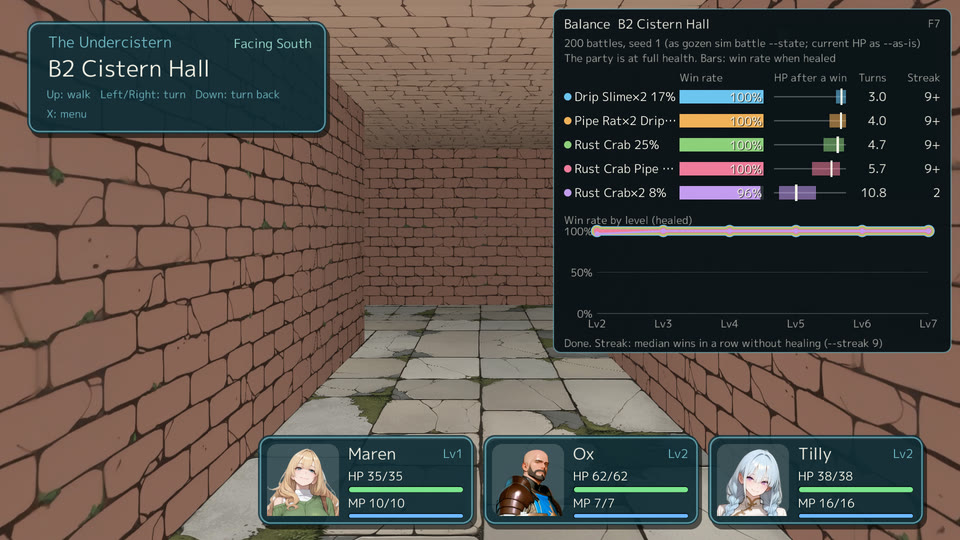
Now try the author tools on it. With --dev, F7 shows the win rates of the battles at the current place:
go run . --dev --mute --start b2 --party maren,ox,tilly
3. Start your own game #
A game is a directory with game.yaml, data/*.yaml and assets/, plus a small Go program that embeds it and hands it to play.Main.
mygame/
├── go.mod
├── main.go
└── game/
    ├── game.yaml
    ├── data/world.yaml
    └── assets/
        └── slime.png
Create the module:
mkdir mygame && cd mygame
go mod init example.com/mygame
go get github.com/nao1215/gozen@latest
mkdir -p game/data game/assets
main.go runs the game and passes the command-line options to play.Main, so --dev, --dir and the rest work in your game too:
// Command mygame runs the game in game/ with Gozen's play.Main.
package main

import (
	"context"
	"embed"
	"fmt"
	"os"
	"os/signal"

	"github.com/nao1215/gozen/play"
)

//go:embed game
var files embed.FS

func main() {
	ctx, stop := signal.NotifyContext(context.Background(), os.Interrupt)
	defer stop()
	if err := play.Main(ctx, files, "game", os.Args[1:], play.Config{Output: os.Stdout}); err != nil {
		fmt.Fprintln(os.Stderr, err)
		os.Exit(1)
	}
}
game/game.yaml names the game and the start. Without fonts, the game uses the Go font built into Gozen, which has Latin letters only; for Japanese and other scripts, put your own font under assets/ and name it in fonts.regular. language: en gives Gozen’s built-in menus and battle messages in English (ja gives Japanese; English is the default). The text map changes any of them to the game’s own wording; its keys are the engine’s Japanese source text, listed in the English catalog.
schema_version: 2
id: first-steps
title: First steps
language: en
screen: {width: 960, height: 540}
start: {location: village, party: [hero]}
terms: {currency: G, level: Lv., hp: HP, mp: MP, exp: EXP}
text:
  はじめから: Begin the tale
game/data/world.yaml holds the rest. Any number of files in data/ are merged:
classes:
  fighter:
    name: Fighter
    stats: {mhp: "20 + level * 6", mmp: 4, atk: "5 + level", def: 3, mat: 1, mdf: 2, agi: 6, luk: 1}
    exp_for: level * 20
actors:
  hero: {name: Hero, class: fighter}
skills:
  attack: {name: Attack, effects: [{damage: a.atk}]}
  guard: {name: Guard, scope: self}
enemies:
  slime:
    name: Slime
    image: slime.png
    stats: {mhp: 14, mmp: 0, atk: 3, def: 1, mat: 0, mdf: 0, agi: 2, luk: 1}
    gold: 2
    exp: 8
    ai: [{use: attack}]
troops:
  slimes: {members: [slime, slime]}
locations:
  village:
    name: Village
    people:
      - name: Elder
        talk:
          - say: Slimes have been seen in the field.
          - set: {flag.asked: true}
    exits:
      - {to: field, label: Go to the field, when: flag.asked}
  field:
    name: Field
    actions:
      - label: Look around
        do:
          - battle: slimes
            on_win: [{say: The field is quiet again.}, {gold: 5}]
    exits: [{to: village, label: Back to the village}]
The enemy needs a picture. Any PNG will do; this one is a small marker from Gozen’s own tests (MIT):
go mod tidy
cp "$(go list -m -f '{{.Dir}}' github.com/nao1215/gozen)/e2e/atago/fixtures/game/assets/mote.png" game/assets/slime.png
Check it, then ask how hard the fight is:
gozen check game
gozen sim battle game slimes
gozen sim battle game slimes --level 2
ok: 2 locations, 0 events, 1 actors, 2 skills, 0 items, 1 enemies, 1 troops, 0 ai sets
slimes: 200 battles  win 64%  lose 36%  fled 0%  draw 0%  avg turns 5.6  avg standing after a win 1.0
slimes: 200 battles  win 100%  lose 0%  fled 0%  draw 0%  avg turns 4.5  avg standing after a win 1.0
A typo is caught with its place in the file:
data/world.yaml:30:10: locations.village.exits[0].to: unknown location "feild" [GZN1101]
Play it. --dir game reads the YAML from disk instead of the embedded copy, so F5 reloads your edits while the game runs:
go run . --dev --dir game
When it is ready to ship, go build embeds the game directory into one binary; players run it with no options.
Next #
- Writing a game explains places, events, battles and expressions.
- The edit–play loop covers F5, F7, F9 and the test-play options.
- Schema lists every field.