Cookbook
On this page
Find what you want to make, copy the YAML into a file under data/ (or into game.yaml where the recipe says so), and change the names. Every block on this page is loaded by the tests over a small game, so it works as written; each recipe links to the full reference on the Schema page and, where it has the same feature, to the Go Zen sample. The gozen commands the recipes use are collected at the end, in Commands used by the recipes.
The recipes refer to a few IDs they do not define: the actor and class walker, the class mender, the skills attack and guard, the item key, the enemy mote, the troop wolves and the locations field, ridge, shop and gate. Use your own in their place.
By task #
| You want to | Uses |
|---|---|
| Start a new game | start in game.yaml, an opening event |
| Open a shop | shops, items with a price, the shop command |
| Run an inn and a place to save | actions, if on gold, heal: all, save: true |
| Write talk with choices and branches | people, say, choice, if |
| Remember things with flags and conditions | set, flag.* and var.*, when, trigger: auto |
| Let the player roll back and save in a scene | ui.rollback, a choice’s id, chose.* |
| Stage portraits and effects | stand, effect, music fades, wait and sfx that hold |
| Add voices | say.voice, actor voices, ui.voice |
| Add a companion who joins | actors, join, leave |
| Grow by level and learn skills | class stats formulas, exp_for, skills by level |
| Make items and equipment | item use, kind, slot, stats, class equip |
| Add a status effect | states, add_state, remove_state |
| Set up troops and enemy AI | enemies, troops, encounters, AI rules |
| Give the party tactics | actor ai, shared ai sets, tactic catalogs and presets |
| Stage a boss fight | boss: true, troop events, battle with on_win |
| Send the party home instead of game over | game_over.event, battle.retry |
| Draw a dungeon by hand | dungeon.map, tiles |
| Put a chest in a dungeon | once and after tiles |
| Lock a door with a key | a solid tile with when, take |
| Make a one-way passage | slide tiles |
| Generate dungeon floors | generate, place, dive |
| Let strong foes roam a floor | roamers |
| Change a dungeon’s look | looks by floor, textures, darkness |
| Show a map with points and roads | map, points, roads |
| Make a campaign | regions, factions, campaign, orders, clash, gozen sim campaign |
| Mix a campaign with a dungeon | an order with move, a dungeon’s way out, a.atk in clash |
| Paint a scene with people and balloons | stage, spots, dolls, bubbles |
| Give a character faces and a moving portrait | faces, say.face, puppet |
| Set the face icons | face_box, face_shade, a doll’s icon |
| Show event pictures and fill the gallery | image, gallery.cgs, gallery.scenes |
| Keep a character book | profiles, ui.profiles, open: profiles |
| Play music for places, battles and moods | music.songs, music, battle_music, mood rules |
| Change the language and the engine’s wording | language, text, terms |
| Offer the game in two languages | written_in, languages, lang/<code>.yaml |
| Test-play with notes, reload and quick starts | memo, --dev, F5, F9, --start |
| Measure battles with sim battle and sim dive | gozen sim battle, gozen sim dive |
| Check and measure in CI | setup-gozen, gozen check, gozen sim in GitHub Actions |
| Cut a release and a trial | trial.yaml, gozen pack release, gozen pack trial |
Start a new game #
start in game.yaml says where a new game begins, with whom, and what they carry; start.event runs once before the player gets control.
# game.yaml
title: Lantern Trail
start:
  location: village
  party: [walker]
  gold: 50
  items: {key: 1}
  event: opening
locations:
  village: {name: Village, background: village.jpg, exits: [{to: field, label: Out to the field}]}
events:
  opening:
    do:
      - say: The lantern by the gate has gone out again.
Open a shop #
A shop is a list of goods with prices. Open it from an action, an exit or anyone’s talk with the shop command; selling to it pays half the price.
items:
  tonic: {name: Tonic, price: 8, desc: Restores 30 HP., use: {scope: one_ally, effects: [{heal: 30}]}}
  lamp_oil: {name: Lamp oil, price: 3}
shops:
  general:
    name: General store
    greeting: Take a look around.
    keeper: keeper.png
    goods: [tonic, lamp_oil]
locations:
  market:
    name: Market
    actions:
      - {label: Shop, do: [{shop: general}]}
    exits: [{to: field, label: Out to the field}]
sell: false makes a shop that only sells, and spent: var.NAME adds every purchase to a variable. Reference: Shop, Item.
Run an inn and a place to save #
An inn is an action that takes gold and heals everyone; a save point is an action with save: true. safe: true also lets the player save from the menu here.
locations:
  inn:
    name: Inn
    safe: true
    actions:
      - label: Stay the night (10G)
        do:
          - if: gold >= 10
            then: [{gold: -10}, {heal: all}, {say: You wake up rested.}]
            else: [{say: You cannot pay for a room.}]
      - {label: Save, do: [{save: true}]}
    exits: [{to: field, label: Leave}]
Reference: Location, Action. Go Zen’s inn, The Dry Cup, has a rest and a save point.
Write talk with choices and branches #
A person’s talk is a list of commands. say shows a line, choice asks a question with its own commands for each answer, and if branches on a condition.
items:
  letter: {name: Letter, kind: key}
locations:
  well:
    name: Old well
    people:
      - name: Keeper
        image: keeper.png
        talk:
          - say: {who: Keeper, text: Will you carry a letter to the ridge?}
          - choice:
              - label: I will
                do:
                  - give: {item: letter}
                  - say: {who: Keeper, text: Thank you. Mind the wolves.}
              - label: Not now
                do: [{say: {who: Keeper, text: Come back if you change your mind.}}]
      - name: Guard
        talk:
          - if: item.letter > 0
            then: [{say: {who: Guard, text: A letter for the ridge? Go on.}}]
            else: [{say: {who: Guard, text: Nobody passes without business.}}]
A choice answer can have its own when, and prompt puts a line above the answers. Reference: Person, Say, ChoiceOption, Command.
Remember things with flags and conditions #
set writes flags (flag.NAME, true or false) and variables (var.NAME, numbers); anything with when appears only while its condition holds. An event with trigger: auto runs as soon as its when holds.
locations:
  crossing:
    name: Crossing
    people:
      - name: Ferryman
        when: "!flag.ferry_gone"
        talk:
          - set: {var.asked: "var.asked + 1"}
          - say: {who: Ferryman, text: Ask me again tomorrow.}
    exits:
      - {to: ridge, label: Wade across, when: flag.ferry_gone}
events:
  ferry_leaves:
    trigger: auto
    when: "var.asked >= 3 && !flag.ferry_gone"
    once: true
    do:
      - say: The ferry has left for the season. The river is low enough to wade.
      - set: {flag.ferry_gone: true}
To catch typos in names, declare the variables in game.yaml and turn on strict:
# game.yaml
state:
  strict: true
  names:
    var.asked: {type: number, initial: 0}
    flag.ferry_gone: {type: bool, initial: false}
Reference: Command (set, if), Event, StateNames, and the expressions on Writing a game. Go Zen opens its dungeon gate with flags.
Let the player roll back and save in a scene #
In the novel window, the player can step back a line with the “Back” button, Q or the mouse wheel: the flags, variables, items and the answers given go back too, and a choice comes back to be answered again. Read lines, the gallery and the settings stay. Rolling back stops at a battle, a shop, a save command, a screen, a move or the end, and reaches up to 8 earlier events; ui.rollback changes that number, and 0 turns rolling back off. “Save” and “Load” on the band save in the middle of a scene: loading begins the event again from its start and reads on to the line, with the same answers and the same random numbers.
# game.yaml
schema_version: 4
ui:
  message: novel
  rollback: 16
A choice with an id remembers the option taken, read as chose.<id>: the option’s id, or its number from 0. It is part of the state, so it rolls back and is saved.
events:
  dinner:
    do:
      - say: Soup or bread?
      - choice:
          - {id: soup, label: Soup}
          - {id: bread, label: Bread}
        id: dinner
      - if: chose.dinner == "soup"
        then: [{say: Warm.}]
        else: [{say: Crisp.}]
gozen.Restore reads a save made in the middle of an event the same way, so a test can check that a save made at any line goes on at that line (the Go API). Reference: UIStyle, Command (id).
Stage portraits and effects #
In the novel window, portraits come and go with the speakers by themselves. An event that uses stand places them as written instead: who stands where, how they come in (fade or slide) and when they leave. A line’s face still changes the expression of a portrait standing. effect shakes one portrait or the screen, plays a reaction of a moving portrait, or fades the screen through a color; music fades in and out; a wait with skip: false holds even in skip mode, and a sfx with wait: true holds until the sound ends.
# game.yaml
schema_version: 4
ui:
  message: novel
music:
  songs:
    rain: {file: rain.ogg}
events:
  meeting:
    do:
      - stand: {who: Keeper, face: keeper.png, at: left}
      - say: {who: Keeper, face: keeper.png, text: You came back.}
      - stand: {who: Guard, face: guard.png, at: right, enter: slide}
      - effect: {name: shake, who: Guard, seconds: 0.4}
      - say: {who: Guard, face: guard.png, text: Stand where you are.}
      - music: {song: rain, fade: 2}
      - wait: {seconds: 0.8, skip: false}
      - sfx: {name: door, wait: true}
      - stand: {who: Guard, leave: fade}
      - effect: {name: fade, color: "#000000", seconds: 1, hold: 0.5}
      - stand: none
      - music: {stop: true, fade: 3}
at is left, center, right or a fraction of the screen’s width. A name that is not an actor needs face, a picture under assets/; an actor’s face is one of its faces. The headless session sees stand as an effect (Effect.Kind stand, with the actor), so a test can check who stands in a scene. Every map form needs schema_version: 4; the old string forms work as before. Reference: Stand, EffectCue, WaitCue, SFXCue, MusicCue.
Add voices #
A line’s voice names its recording. For an actor with voices, a folder under assets/, it is a name in that folder, and the extension (.ogg or .wav) may be left out; for anyone else it is a path under assets/.
# game.yaml
schema_version: 4
ui:
  message: novel
  voice:
    cut: true        # the next line stops a voice still playing (the default)
    auto_wait: true  # auto waits for the voice to end (the default)
actors:
  keeper: {name: Keeper, class: walker, voices: keeper/voice}
events:
  welcome:
    do:
      # plays assets/keeper/voice/welcome_001.ogg
      - say: {who: keeper, voice: welcome_001, text: Come in out of the cold.}
      - say: {who: Traveler, voice: voice/traveler_001.ogg, text: Thank you.}
A voice plays when its line opens and stops at the next line. Skip mode, Ctrl over a line read, scene skip and the replay of rolling back pass the voices of the lines they pass; the line they land on speaks. The settings have a voice volume and a volume for each actor with voices. gozen check reports a voice file that is not there and counts the lines of a voiced actor without one (GZN0109). The headless session sees each voice as an effect (Effect.Kind voice, with the file), and a trace has a voice line for each voice played. Reference: Say (voice), Actor (voices), VoiceStyle.
Add a companion who joins #
A companion is an actor. join adds them to the party and leave takes them out; a flag keeps them from offering twice.
actors:
  sela:
    name: Sela
    class: mender
    faces: sela              # assets/sela/normal.png
    back: true               # starts in the back row
locations:
  hut:
    name: Hut
    people:
      - name: Sela
        image: sela/normal.png
        when: "!flag.sela_joined"
        talk:
          - say: {who: sela, text: You are going to the ridge? I will walk with you.}
          - join: sela
          - set: {flag.sela_joined: true}
join_exp in game.yaml raises a newcomer’s experience to the party’s. Reference: Actor, Command. Go Zen’s Ox, Tilly and Kes join this way.
Grow by level and learn skills #
A class gives each stat as a formula of level, the experience each level needs, and the skills learned on the way.
skills:
  spark: {name: Spark, mp: 3, effects: [{damage: a.mat * 2 - b.mdf}]}
  mend: {name: Mend, mp: 4, scope: one_ally, anim: heal, effects: [{heal: 10 + a.mat}]}
classes:
  scholar:
    name: Scholar
    stats: {mhp: "18 + level * 5", mmp: "6 + level * 2", atk: 3, def: 2, mat: "4 + level * 2", mdf: 4, agi: 5, luk: 2}
    exp_for: level * 25
    skills:
      - {level: 1, skill: spark}
      - {level: 4, skill: mend}
actors:
  ione: {name: Ione, class: scholar}
Experience comes from enemies’ exp and the exp command; learn teaches a skill at any time. A class tree adds a skill tree paid with SP. Reference: Class, Learning, Skill.
Make items and equipment #
An item with use can be used from the menu or in battle. Equipment has a kind, the slot it goes into and the stats it adds; a class lists the kinds it can wear.
items:
  tonic:
    name: Tonic
    price: 8
    desc: Restores 30 HP.
    use: {scope: one_ally, effects: [{heal: 30}]}
  bronze_blade: {name: Bronze blade, kind: sword, slot: weapon, price: 60, stats: {atk: 4}}
  leather_vest: {name: Leather vest, kind: vest, slot: armor, price: 40, stats: {def: 3}}
classes:
  fencer:
    name: Fencer
    equip: [sword, vest]
    stats: {mhp: "20 + level * 6", mmp: 2, atk: "5 + level", def: 3, mat: 1, mdf: 2, agi: 6, luk: 2}
    exp_for: level * 20
actors:
  fen: {name: Fen, class: fencer, equip: {weapon: bronze_blade}}
The slots are weapon, armor and accessory unless equip_slots in game.yaml says otherwise. Reference: Item, Usage, Slot.
Add a status effect #
A state is put on with add_state and taken off with remove_state (or bad for every bad state). on_turn_end runs its effects at the end of each turn.
states:
  poison:
    name: Poison
    short: PSN
    bad: true
    turns: 5
    on_turn_end: [{damage: 3}]
    messages: {add: "{target} is poisoned!", remove: "{target} feels better."}
skills:
  sting: {name: Sting, effects: [{damage: a.atk}, {add_state: poison, chance: 0.4}]}
items:
  antidote: {name: Antidote, price: 6, use: {scope: one_ally, effects: [{remove_state: poison}]}}
restrict: skip makes a state cost turns (sleep), stats changes the holder’s stats (a buff), and persist: true keeps it after the battle. Reference: State, Effect.
Set up troops and enemy AI #
An enemy needs a picture, all eight stats and its AI: rules tried by priority, each with an optional condition and target. A troop is the group met together; encounters sets how often troops are met here.
skills:
  bite: {name: Bite, effects: [{damage: a.atk + 2}]}
enemies:
  bat:
    name: Bat
    image: bat.png
    stats: {mhp: 14, mmp: 0, atk: 4, def: 1, mat: 0, mdf: 1, agi: 7, luk: 2}
    exp: 4
    gold: 3
    drops: [{item: key, chance: 0.1}]
    ai:
      - {use: bite, when: "self.hp_rate < 0.5", priority: 1}
      - {use: attack, target: weakest}
troops:
  bats: {members: [bat, bat]}
  mixed: {members: [bat, mote]}
locations:
  cave_mouth:
    name: Cave mouth
    encounters:
      rate: 0.25
      troops: [{troop: bats, weight: 3}, {troop: mixed}]
Reference: Enemy, Rule, Target, Troop, Encounter. To see how hard a troop is, measure it.
Give the party tactics #
Party members on Auto follow their own ai, written inline or as a shared set under ai. The tactics screen lets the player change them; the catalogs say which conditions, targets and actions it offers.
skills:
  mend: {name: Mend, mp: 3, scope: one_ally, anim: heal, effects: [{heal: 12}]}
ai:
  healer:
    - {use: mend, when: "allies.hp_rate < 0.7", target: ally_lowest_hp_rate, priority: 1}
    - {use: attack}
actors:
  sela: {name: Sela, class: mender, ai: healer}
tactic_conditions:
  always: {name: Always, kind: always}
  hurt: {name: An ally is hurt, kind: hp_below, subject: allies}
tactic_targets:
  foe: {name: A foe, scope: one_enemy}
  weakest: {name: The most hurt ally, scope: one_ally, selector: {pick: min, by: t.hp_rate}}
tactic_actions:
  strike: {name: Attack, use: attack, target: foe}
  heal: {name: Mend, use: mend, target: weakest}
# game.yaml
battle:
  tactic_presets:
    careful:
      name: Careful
      description: Heal first, then attack.
      rows:
        healer:                # the AI the rows replace
          - {enabled: true, condition: hurt, percent: 60, action: heal}
          - {enabled: true, condition: always, action: strike}
The rows are keyed by the AI they replace. In an event, set: {actor.sela.tactics: careful} picks a preset and auto or manual switches the mode. Reference: Actor, Rule, TacticPreset, TacticCondition, BattleCfg. Go Zen’s party has AI rules and three presets.
Stage a boss fight #
A boss is an enemy with boss: true. Its troop can forbid running away, say a line at the start, and run commands mid-battle; the battle command decides what winning and losing do.
skills:
  quake: {name: Quake, scope: all_enemies, effects: [{damage: 8}]}
enemies:
  warden:
    name: Stone warden
    title: Keeper of the gate
    image: warden.png
    boss: true
    stats: {mhp: 120, mmp: 0, atk: 9, def: 4, mat: 0, mdf: 3, agi: 3, luk: 1}
    exp: 60
    gold: 40
    ai:
      - {use: quake, when: "turn % 3 == 0", priority: 1}
      - {use: attack}
troops:
  warden:
    members: [warden]
    can_escape: false
    intro: The statue in the gate opens its eyes.
    events:
      - {when: "turn == 4", do: [{say: Cracks run across the warden's shell.}]}
locations:
  gate_hall:
    name: Gate hall
    actions:
      - label: Face the warden
        when: "!flag.warden_beaten"
        do:
          - battle: warden
            on_win: [{set: {flag.warden_beaten: true}}, {say: The way north is open.}]
    exits:
      - {to: gate, label: Go north, when: flag.warden_beaten}
level_scale on the troop keeps an over-leveled party from crushing it, and music gives it its own song. Reference: Enemy, Troop, TroopEvent, LevelScale.
Send the party home instead of game over #
game_over.event runs instead of the game over screen; battle.retry offers to fight a lost battle again.
# game.yaml
game_over: {event: carried_home}
battle: {retry: true}
locations:
  home: {name: Home, safe: true, exits: [{to: field, label: Out to the field}]}
events:
  carried_home:
    do:
      - say: A passing carter brings you home. Half your gold is gone.
      - gold: -floor(gold / 2)
      - heal: all
      - move: home
Reference: GameOver, BattleCfg.
Draw a dungeon by hand #
A location with dungeon is walked in first person. Each character of map is a cell: # a wall, . a floor, D a door, and any character you define in tiles.
locations:
  crypt:
    name: Crypt
    battle_background: crypt.jpg
    encounters: {rate: 0.08, troops: [{troop: wolves}]}
    dungeon:
      wall: wall.jpg
      door: door.jpg
      floor: "#8a8f99"
      ceiling: "#2a2d33"
      map: |
        #########
        U.S.#...#
        ###.D.#.#
        #.....#.#
        #########
      tiles:
        S: {start: true, facing: east}
        U: {name: Stairs up, look: door, symbol: U, do: [{move: field}]}
Lead into it with an exit like any place (exits: [{to: crypt}]). Reference: Dungeon, Tile. Go Zen’s first two floors are hand-drawn mazes.
Put a chest in a dungeon #
A tile with once: true runs its commands a single time and then becomes its after character, here an open chest.
locations:
  storeroom:
    name: Storeroom
    dungeon:
      map: |
        #######
        #S...T#
        #######
      tiles:
        S: {start: true, facing: east}
        T:
          name: Old chest
          picture: chest.png
          solid: "true"
          once: true
          after: t
          mark: "#edbe70"
          do: [{gold: 20}, {say: Inside the chest are 20 gold coins.}]
        t: {name: Open chest, picture: chest_open.png, solid: "true"}
Reference: Tile. Go Zen’s floors have the same chests.
Lock a door with a key #
A tile is there only while its when holds; otherwise it becomes its else character, a floor by default. Walking into a solid tile runs its commands.
locations:
  vault:
    name: Vault
    dungeon:
      map: |
        #########
        #S..L..E#
        #########
      tiles:
        S: {start: true, facing: east}
        L:
          name: Locked door
          look: door
          solid: "true"
          when: "!flag.vault_open"
          do:
            - if: item.key > 0
              then: [{take: {item: key}}, {set: {flag.vault_open: true}}, {say: The key turns in the lock.}]
              else: [{say: The door is locked.}]
        E: {name: Way out, look: door, do: [{move: gate}]}
The key itself can come from a chest, a shop or a person. Reference: Tile. Go Zen’s Cistern Hall has three brass gates and three brass keys.
Make a one-way passage #
A slide tile carries the party on in one direction, so the passage can be crossed only that way.
locations:
  river_cave:
    name: River cave
    dungeon:
      map: |
        #########
        #S.>>>..#
        #########
      tiles:
        S: {start: true, facing: east}
        ">": {name: Fast water, slide: east, hint: (one way), mark: "#6fa8dc", symbol: ">"}
slide: facing makes ice, and spin turns the party around when it stops. Reference: Tile.
Generate dungeon floors #
With generate instead of map, every floor is built anew: a maze of rooms and corridors with the characters of place put in it. dive goes down; var.floor is the floor number. Inside generate and roamers (such as a count), plain floor is that number too; in the commands of a tile it is the floor() function, so write var.floor there.
locations:
  depths:
    name: The depths
    encounters: {rate: 0.1, troops: [{troop: wolves}]}
    dungeon:
      wall: wall.jpg
      generate:
        width: 15
        height: 15
        rooms: 3
        start: S
        place:
          - {char: ">", far: true}
          - {char: T, count: "floor < 5 ? 2 : 1"}
      tiles:
        S: {start: true}
        ">": {name: Stairs down, symbol: v, do: [{dive: depths, floor: var.floor + 1}]}
        T: {name: Chest, picture: chest.png, solid: "true", once: true, after: ".", do: [{gold: var.floor * 5}]}
Enter it with a dive: depths command. seed gives every save the same maps, and floors sets a seed or a hand-drawn map for one floor, such as a boss floor. Reference: Generate, Put, FloorPlan. Look at the floors and play a dive before you tune them.
Let strong foes roam a floor #
A roamer walks a generated floor and starts its battle when it touches the party; once beaten it is gone.
locations:
  catacombs:
    name: Catacombs
    dungeon:
      generate: {width: 13, height: 13, rooms: 2, start: S, place: [{char: ">", far: true}]}
      tiles:
        S: {start: true}
        ">": {name: Stairs down, do: [{dive: catacombs, floor: var.floor + 1}]}
      roamers:
        - name: Ghoul
          picture: ghoul.png
          move: chase
          sight: 5
          count: "floor >= 3 ? 1 : 0"
          troops: [{troop: wolves}]
move is chase, wander, guard or hunt, and meet runs commands instead of a battle. Reference: Roamer.
Change a dungeon’s look #
looks replace the walls, colors, darkness, music and the area name while their when holds, for example by floor (var.floor). The first that holds wins.
locations:
  tower:
    name: Tower
    dungeon:
      wall: brick.jpg
      floor: "#9c8f7a"
      floor_texture: stone.jpg
      darkness: 0.4
      generate: {width: 11, height: 11, start: S, place: [{char: ">", far: true}]}
      tiles:
        S: {start: true}
        ">": {name: Stairs up, do: [{dive: tower, floor: var.floor + 1}]}
      looks:
        - {when: "var.floor >= 6", area: Upper floors, wall: marble.jpg, floor: "#c8c8d0", darkness: 0.2}
        - {when: "var.floor >= 3", area: Middle floors, wall: mossy.jpg, ceiling_texture: vines.jpg}
A look can also set battle_background, music, battle_music and no_map. Reference: DungeonLook, Dungeon.
Use a dungeon theme #
A theme is a wall, a floor, a ceiling and a door picture with matching colors. gozen theme list names the five that come with the gozen binary (cave, ice, ruins, castle, crystal); gozen theme add copies one into the game, with no network.
gozen theme add cave game
gozen theme add ice game
Then name it in the dungeon, and in a look for the deeper floors. What the YAML writes itself (wall, door, floor, ceiling, floor_texture, ceiling_texture) wins over the theme, and a look with a theme replaces the dungeon’s theme for what the look does not write.
locations:
  tower:
    name: Tower
    dungeon:
      theme: cave
      generate: {width: 11, height: 11, start: S, place: [{char: ">", far: true}]}
      tiles:
        S: {start: true}
        ">": {name: Stairs up, do: [{dive: tower, floor: floor + 1}]}
      looks:
        - {when: "var.floor >= 3", area: Deeper floors, theme: ice, door: gate.jpg}
The five themes in the same corridor, cave, ice, ruins, castle and crystal:
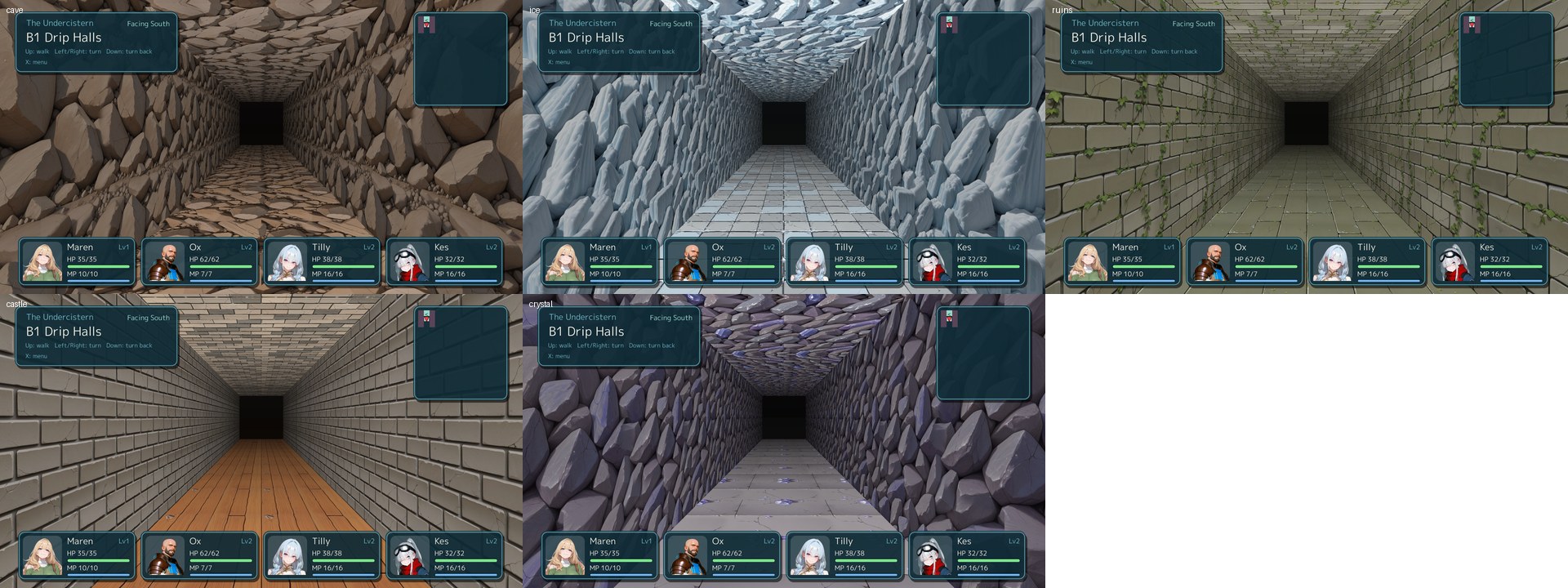
gozen check fails with GZN1111 when a named theme is not in the game. Reference: Dungeon, DungeonLook.
Show a map with points and roads #
A location with map is a picture with points on it (schema_version: 3). The party walks the open roads from point to point; a point with to leads into that location, and one with only do runs its commands there.
locations:
  valley:
    name: Valley
    map:
      picture: maps/valley.jpg        # point positions are in this picture's pixels
      unknown: dim
      points:
        home:   {at: [300, 620], to: field, start: true}
        store:  {at: [620, 480], to: shop}
        shrine: {at: [880, 600], label: Shrine, do: [{heal: all}, {say: You feel refreshed.}]}
        pass:   {at: [1100, 260], to: ridge, when: flag.pass_open, locked: Snow blocks the pass.}
      roads:
        - {between: [home, store], steps: 2}
        - {between: [store, shrine], via: [[760, 520]]}
        - {between: [shrine, pass], steps: 3, encounters: {rate: "0.2", troops: [{troop: wolves}]}}
Paint the roads in the picture: the lines in the YAML are what the token walks, drawn only with draw_roads: true. Reference: Atlas, MapPoint, Road, and Maps and painted scenes.
Make a campaign #
A campaign is a war of regions over turns (schema_version: 5): factions hold regions, the player gives a few orders a turn with the generals (actors of the game), and the other factions move by their ai rules when the turn ends. Its place is a map whose points are named like the regions.
schema_version: 5
campaign:
  location: war
  player: crown
  turns: 10
  calendar: week                  # the band says "Year 1, week 1"
  count: orders                   # each order once a turn, then End turn
  generals:
    walker: {troops: 500, might: 3, tactic: guard, skills: [volley]}
  clash:
    units: 2                      # at most two units a side (1: a duel)
    per_soldier: 30               # one soldier in the ranks for 30 troops (the default is 50)
    # or, instead of the ranks, an army by kind: poses of one soldier, lined up by the engine
    # (the kind follows the leader: generals.<id>.army, enemies.<id>.army)
    # armies: {men: [soldiers/men_1.png, soldiers/men_2.png], monsters: [soldiers/orc_1.png]}
    # max_soldiers: 4            # most soldiers one unit of an army shows
    # layout: front               # or below (the default): large cards of the leaders along the bottom
    backgrounds: {field: bg/field.jpg, castle: bg/castle.jpg}
    skills:
      volley: {label: Volley, charge: 3, all: true, power: "a.troops * 0.12"}
  orders:
    attack: {label: Attack, general: ready, target: border, march: true, fight: clash_view, generals: 2,
             on_win: [{say: {who: walker, text: The ford is ours.}}]}
    draft: {label: Draft, per_turn: 1, when: "gold >= 50", general: any, do: [{gold: -50}, {set: {general.troops: "general.troops + 150"}}]}
factions:
  crown: {name: Crown, color: "#3060c0", capital: vale}
  raven:
    name: Raven
    color: "#c03030"
    capital: well
    ai:
      - {draft: "150"}
      - {march: true, keep: 800, where: "s.troops * 0.6 > t.troops * 1.25", pick: min, by: t.troops}
regions:
  vale: {name: Ashvale, next: [ford], owner: crown, troops: 600, terrain: castle, area: [[0, 0], [600, 0], [600, 1080], [0, 1080]]}
  ford: {name: Brookford, next: [vale, well], troops: 350, terrain: field, defend: wolves, area: [[600, 0], [1300, 0], [1300, 1080], [600, 1080]]}
  well: {name: Deepwell, next: [ford], owner: raven, troops: 1500, terrain: castle, defend: wolves, area: [[1300, 0], [1920, 0], [1920, 1080], [1300, 1080]]}
locations:
  war:
    name: The war
    map:
      picture: maps/land.jpg          # the areas are in this picture's pixels
      points:
        vale: {at: [300, 540], start: true}
        ford: {at: [950, 540]}
        well: {at: [1600, 540]}
      roads:
        - {between: [vale, ford]}
        - {between: [ford, well]}
OK on a region lists the orders it can be given. Attack asks for the target and opens the sortie screen: the generals go in the front and back slots, each with a tactic (the engine’s front, weakest, strongest, leader and guard, or your clash.tactics). fight: clash_view plays the march as two armies on the terrain’s picture: the soldiers in the ranks are the troops, a skill fires when charged, and a table tells the losses. Leave out fight and the march is decided by the numbers of clash (power against defense); fight: battle fights the region’s defend troop as a battle of the game. An area fills a region in its owner’s colour; without one the region shows as a flag. On a map of one picture only the region chosen gets its roads and outline; region_roads: always and region_borders: always on the map draw them all. A region may also stand a cut-out landmark (its city or fort) on its point; it is optional.
Measure it before you tune it: gozen sim campaign game plays 200 campaigns and prints the win rate, the turns and the regions each side held turn by turn; --tactic guard marches every general with one tactic to compare them. Reference: Campaign, Region, Faction, Clash, Order, and Campaigns. Five Banners is a complete one (play it in the browser).
Mix a campaign with a dungeon #
A campaign shares its game with the towns and dungeons: the generals are the party’s actors, and move goes between the war map and any other place. Here an order sends the party into a mine whose way out leads back to the war, and the clash reads the general’s attack, so levels won in the mine make the marches stronger.
schema_version: 5
campaign:
  location: war
  player: crown
  turns: 8
  generals:
    walker: {troops: 400}
  clash:
    power: "a.troops * (1 + a.atk / 20) * (0.8 + rand() * 0.4)"   # the actor's attack counts
  orders:
    attack: {label: Attack, general: ready, target: border, march: true}
    delve: {label: Delve into the mine, cost: 0, do: [{move: mine}]}
factions:
  crown: {name: Crown, capital: home}
  raven: {name: Raven, capital: keep}
regions:
  home: {name: Home, next: [keep], owner: crown, troops: 300}
  keep: {name: Keep, next: [home], owner: raven, troops: 600}
locations:
  war:
    name: The war
    map:
      picture: maps/land.jpg
      points:
        home: {at: [400, 540], start: true}
        keep: {at: [1500, 540]}
      roads: [{between: [home, keep]}]
  mine:
    name: Old mine
    dungeon:
      wall: walls/rock.png
      floor: "#6a6258"
      map: |
        #####
        #S.E#
        #####
      tiles:
        S: {start: true, facing: east}
        E: {name: Way out, look: door, do: [{move: war}]}
    encounters: {rate: "0.2", troops: [{troop: wolves}]}
Gold, items, flags, experience and HP are one state: what the party finds in the mine is there on the map, and generals.walker.troops is there in the mine. Reference: Campaigns and Make a campaign.
Paint a scene with people and balloons #
A location with stage shows its background as a painting the party walks as a small doll (schema_version: 3). The stage says where one can walk, how tall people are at two depths, where the location’s people stand, and what can be looked at; bubbles are lines said now and then in balloons.
locations:
  square:
    name: Square
    background: bg/square.jpg          # painted from a fixed camera
    stage:
      scale: [{at: [640, 700], height: 160}, {at: [640, 430], height: 70}]
      walk: [[[200, 420], [1080, 420], [1260, 715], [20, 715]]]
      spots:
        start: {at: [640, 680], facing: north}
      exits: [{to: field, area: [[560, 420], [720, 420], [720, 440], [560, 440]]}]
      people:
        - {id: baker, at: [420, 600], facing: east, doll: {hair: bun, parts: [{kind: apron, color: "#c08040"}]}}
        - {id: runner, path: [[800, 500], [1000, 520], [900, 640]], speed: 0.9}
      things:
        - {id: well, name: Well, area: [[900, 600], [960, 600], [960, 650], [900, 650]], do: [{say: The water is cold and clear.}], once: true}
    people:
      - id: baker
        name: Baker
        image: baker.png
        talk: [{say: Fresh bread every morning.}]
        bubbles: [Bread, fresh bread!, {text: Back so soon?, when: flag.met_baker}]
      - {id: runner, name: Runner, image: runner.png, talk: [{say: Cannot stop now!}]}
    exits:
      - {to: field, label: Out to the field}
fronts hide people behind pillars and stalls, depth does the same from a depth picture, and ui.balloon in game.yaml sizes the balloons. Reference: Stage, Spot, StagePerson, Thing, Doll, Bubble.
Give a character faces and a moving portrait #
faces is a directory with one picture per expression; a line picks one with face. A puppet makes the talk portrait blink, move its mouth while the text runs and sway; its faces use the same names.
actors:
  guide:
    name: Guide
    class: walker
    faces: walker             # assets/walker/normal.png, assets/walker/smile.png
    puppet: walker/puppet.yaml
events:
  greeting:
    do:
      - say: {who: guide, text: The trail starts here.}
      - say: {who: guide, face: smile, text: Ready when you are.}
The puppet, assets/walker/puppet.yaml (picture paths are relative to it):
base: normal.png
face: normal               # the first face
faces:
  normal: {}
  smile: {image: smile.png}
eyes:
  closed: {image: eyes_closed.png, at: [166, 56]}
mouth:
  frames: [face, {image: mouth_open.png, at: [180, 92]}]
head: {center: [205, 85], radius: 75, neck: [205, 175]}
hair:
  - rect: [130, 70, 50, 90]
Check where each piece lies with gozen art puppet. Reference: Actor, Say, FaceRule, and the puppet format. Go Zen’s Maren has a puppet.
Set the face icons #
Menus and battle cards show a round face icon cut from the standing picture. face_box says where the face is (the center as fractions of the width and height, then the size as a fraction of the width), and face_shade darkens the icon.
actors:
  ione:
    name: Ione
    class: mender
    faces: ione                  # assets/ione/normal.png
    face_box: [0.5, 0.17, 0.32]
    face_shade: 0.15
locations:
  square:
    name: Square
    background: bg/square.jpg
    stage:
      scale: [{at: [640, 700], height: 160}, {at: [640, 430], height: 70}]
      walk: [[[200, 420], [1080, 420], [1260, 715], [20, 715]]]
      spots: {start: {at: [640, 680]}}
      people:
        - {id: baker, at: [420, 600], doll: {icon: icons/baker.png}}   # a square face for balloons
    people:
      - {id: baker, name: Baker, image: baker.png, bubbles: [Fresh bread!]}
In a painted scene, a balloon’s face comes from the doll’s icon, then face_at, then the face boxes that gozen art faces finds. Reference: Actor, Doll.
Show event pictures and fill the gallery #
image shows a full-screen picture under the lines that follow, and image: "" takes it away. The gallery on the title screen opens a picture once it has been shown, and a scene once its flag is set.
events:
  sunrise:
    do:
      - image: {file: cg/sunrise.jpg, fade: 1}
      - say: The sun comes up over the ridge.
      - image: ""
      - set: {flag.saw_sunrise: true}
# game.yaml
gallery:
  cgs:
    - {title: Sunrise, file: cg/sunrise.jpg}
  scenes:
    - {title: Sunrise on the ridge, event: sunrise, flag: saw_sunrise, location: ridge}
files shows several pictures in turn, and look: dream blurs the edges for a memory. Reference: CG, Gallery, GalleryCG, GalleryScene.
Keep a character book #
profiles gives each character a page on the Characters screen: the standing picture with its faces, a few lines of your own labels, an introduction and how they see the others. A profile whose ID is an actor’s shows that actor; picture shows anyone else. Under --dev the title and the menu offer Characters, F6 opens it anywhere and every page is open, so you can check your characters while you write. Run gozen art faces once to center the list’s face icons on the faces. Every text is translated through lang/ like the lines.
# game.yaml
schema_version: 4
ui:
  profiles: true    # Characters in the title, the menu and the novel bar for players too
actors:
  mira:
    name: Mira
    class: walker
    faces: mira             # assets/mira/normal.png, assets/mira/smile.png
profiles:
  mira:
    title: The courier of the pass
    faces: [normal, smile]  # the faces the screen switches between (Z)
    when: flag.met_mira     # a shadow named ??? until then; once open, it stays open
    fields:
      - {label: Role, value: Courier}
      - {label: Likes, value: Hot cider}
    text: Mira has carried letters over the pass for {var.mira_years} winters.
    relations:
      - {who: walker, calls: Boss, text: Trusts them with the map.}
      - {who: you, calls: Stranger}
  keeper:
    name: The keeper
    picture: people/keeper.png
events:
  meet_mira:
    do:
      - set: {flag.met_mira: true}
      - open: profiles
open: profiles opens the book from an event, and a test reads profile.mira.unlocked. Reference: Profile, ProfileField, ProfileRelation, UIStyle.
Play music for places, battles and moods #
A song is a file, or a modular song with one module per mood. A location plays its music, ordinary battles there play battle_music, and a troop’s music comes first. Mood rules switch the mood of a modular song by the moment.
music:
  songs:
    town: {file: music/town.ogg, loop_start: 4.2}
    battle: {file: music/battle.ogg}
    boss: {file: music/boss.ogg}
    cave:                          # assets/music/cave/calm.ogg, assets/music/cave/tense.ogg
      dir: music/cave
      bpm: 96
      moods: {calm: calm, tense: tense}
  rules:
    field:
      - {song: cave, when: "party.min_hp_rate < 0.3", mood: tense}
locations:
  plaza: {name: Plaza, music: town}
  caves: {name: Caves, music: cave/calm, battle_music: battle}
troops:
  champion: {members: [mote], music: boss}
events:
  ambush:
    do:
      - mood: tense
      - battle: wolves
# game.yaml
title_music: town
battle: {music: battle, boss_win_music: town}
A song named battle is the battle music by default. music: town in an event changes the song. Reference: Music, Song, MusicCue, MoodRule.
Change the language and the engine’s wording #
language picks the engine’s own words (menus, battle messages, settings): en or ja. text replaces any of them, keyed by the engine’s Japanese source text; terms names the money and the stats.
# game.yaml
language: en
terms: {currency: coins, level: Lv., hp: HP, mp: MP, exp: EXP}
text:
  はじめから: New journey
The English catalog lists every key, and gozen check warns when the font lacks letters of the chosen words. Reference: Game, Terms.
Offer the game in two languages #
Write data/ in one language and translate it in lang/<code>.yaml: a map text from each text as written to its translation, with the {expressions} kept. languages lets the player choose in the settings; the choice is kept with the settings.
# game.yaml
schema_version: 4
language: en          # shown at first
written_in: en        # the language of data/
languages: [en, ja]   # the settings offer both
events:
  dinner:
    do:
      - say: {who: Keeper, text: "Soup or bread? You have {gold} gold."}
      - choice: [{label: Soup}, {label: Bread}]
# lang/ja.yaml
text:
  "Soup or bread? You have {gold} gold.": "Supu to pan, dochira ni? Shojikin wa {gold} G."
  "Keeper": "Yado no shujin"
  "Soup": "Supu"
  "Bread": "Pan"
Lines, speakers, choices, prompts and notices are translated as they are shown, and the names and descriptions of places, people, actions, exits, items, skills, states, enemies, classes, shops, the title and the gallery’s scenes when the language changes. Read lines are kept by the text as written, so they stay read in every language. One text has one translation: when the same words must be translated differently in two places, write them differently. The same map may also replace the engine’s own words in that language, as text in game.yaml does.
gozen check reports a translation that drops or changes an {expression}, warns of a key that is no text of the game (GZN0110) and of every text not translated yet (GZN0111, each with its path; --format json lists them for a script or an agent to fill the file), and lays out the lines in each language. A test of the Japanese game loads the same files with game.yaml changed to language: ja (gozen.Load with an overlay); its requests are in Japanese. Reference: Game (written_in, languages).
Test-play with notes, reload and quick starts #
Run your game with --dev: F5 reloads the YAML without losing your place, F9 writes a note (a screenshot, the state and your comment), and --start and its friends begin anywhere. memo in game.yaml sets the kinds of note and the numbers kept with each.
# game.yaml
memo:
  kinds:
    - {id: text, label: Wording}
    - {id: balance, label: Too hard or too easy}
    - {id: bug, label: Bug}
  vars:
    - {name: gold, value: gold}
    - {name: steps, value: steps}
The commands are in Test play. Reference: MemoCfg, and The edit–play loop for every key and option.
Measure battles with sim battle and sim dive #
gozen sim battle fights a troop many times on AUTO and prints the win rate; gozen sim dive takes the party down a generated dungeon floor by floor, with its levels, gold and boss win rates. Change a stat, an AI rule or a troop, and measure again. The F7 panel shows the same numbers while you play.
The commands are in Check and measure. Reference: Commands.
Check and measure in CI #
Let every push run the check and the numbers. In GitHub Actions, setup-gozen installs the release binary of the version in your go.mod, checked against the release checksums:
# .github/workflows/game.yml
on: [push, pull_request]
jobs:
  check:
    runs-on: ubuntu-latest
    steps:
      - uses: actions/checkout@v6
      - uses: nao1215/setup-gozen@1c378fc446f62ecb29a7bcd40aea6dff8565d698 # v0.1.1
      - run: gozen check game
      - run: gozen sim battle game boss --format json   # boss: a troop id of your game
      - run: gozen sim campaign game --format json      # for a campaign
gozen check exits 1 on any error, so the job fails on a broken reference. Without the action, go run github.com/nao1215/gozen/cmd/gozen check game builds the version in go.mod. Reference: Install, Commands.
Cut a release and a trial #
gozen pack release copies the game with only approved pictures; gozen pack trial keeps the part of the game within the range of trial.yaml, a demo. Here the demo stops at the third floor of the grotto and leaves out the ending event:
# game/trial.yaml
dive_max: {grotto: 3}      # dives below the third floor run blocked instead
cut: [finish]              # the ending; calls to it run blocked instead
blocked:
  - say: This is as far as the trial goes. Thank you for playing!
The release reads which pictures are approved from the game’s asset-policy.yaml and the inspection records:
# game/asset-policy.yaml
overlay: ../overlay
report: approvals.json
extensions: [.png]
inspection: {file: file, source: source, required: required, approved: approved}
records: {file: file, source: source, required: required, approved: approved, output: output}
The commands are in Release and trial. Reference: Commands.
Commands used by the recipes #
The examples use game as the game directory, lesson as a troop and grotto as a generated dungeon. Commands has every option.
Check and measure #
gozen check game                                       # references, expressions, pictures, text layout
gozen sim battle game lesson -n 200 --level 5          # win rate of the party at level 5
gozen sim battle game lesson --party scout --seed 7 -v # the messages of one battle
gozen sim floors game grotto --from 1 --to 3           # the generated maps
gozen sim dive game grotto --floors 5 --boss 5:lesson  # a whole dive: levels, gold and wins per floor
gozen book game > book.md                              # the whole game as one Markdown file
gozen art faces finds the faces of the standing pictures for balloons; it needs a detection model:
gozen art fetch face
gozen art faces game
Test play #
These are options of your game’s binary, run in your game’s module:
go run . --dev --dir game --memos notes           # F5 reloads game/, F9 writes notes/
go run . --dev --start cave_mouth --level 5 --battle bats
go run . --dev --start village --flags sela_joined,var.asked=3 --gold 500
go run . --dev --event greeting --line 2
go run . --dev --dir game --from-memo notes/2026-01-01/001.json
Collect the notes into one HTML page:
gozen play notes notes -o notes-html
Moving portraits #
gozen art puppet streamer/puppet.yaml                        # check it and show where each piece lies
gozen art puppet streamer/puppet.yaml --out streamer-packed  # write it with small difference pictures
Release and trial #
gozen pack release game release --overlay overlay --inspect inspect.jsonl
gozen pack trial game -n                               # count what the trial keeps
gozen pack trial game trial --list trial.txt           # build it, and list what was kept and dropped